The deploy that locked the table
The deployment on Tuesday afternoon contains one schema change: a new nullable column, notes, on the invoices table. In staging the migration took four milliseconds.
In production the API stops answering. For almost five seconds every request that touches an invoice hangs, reads included. Nineteen of twenty-seven reads time out, and the same number of writes. Then everything recovers, and the migration log reports success: one statement, 4.7 seconds.
Nothing was wrong with the statement. Somewhere else, finance was running a report on the same table, and the migration stood in line behind it. Every request that arrived afterwards stood in line behind the migration.
This article shows why a schema change that takes milliseconds can stop a table for seconds or minutes, which changes are dangerous and why, and three habits that make them safe. Examples use ASP.NET Core, EF Core and PostgreSQL. The locking rules are PostgreSQL's; other databases have the same problem with different names.
The whole argument in 40 seconds.
The version everyone writes first
An EF Core migration that adds a column:
protected override void Up(MigrationBuilder migrationBuilder)
{
    migrationBuilder.AddColumn<string>(name: "notes", table: "invoices", nullable: true);
}
which becomes:
ALTER TABLE invoices ADD COLUMN notes text;Adding a nullable column without a default changes only the table's definition. No row is rewritten, so the size of the table does not matter. That is why it took four milliseconds in staging, and why nobody thought about it again.
At Gordium, Arrian reports, Alexander could find no way to untie the knot on the wagon and, by one account, cut it with his sword. A migration written like this takes the same approach to a table in use: one stroke, at whatever moment the deployment happens to run.
Why it fails
To change a table's definition PostgreSQL needs the strongest lock on it, ACCESS EXCLUSIVE. That lock conflicts with every other lock, including the weakest one, ACCESS SHARE, which every SELECT takes and holds until its transaction ends.
So the ALTER TABLE has to wait for every transaction that has touched the table to finish. The wait is not the dangerous part. The queue is. PostgreSQL grants locks in order, so every statement that arrives after the waiting ALTER TABLE waits behind it, even a plain SELECT that would have no conflict with the report.
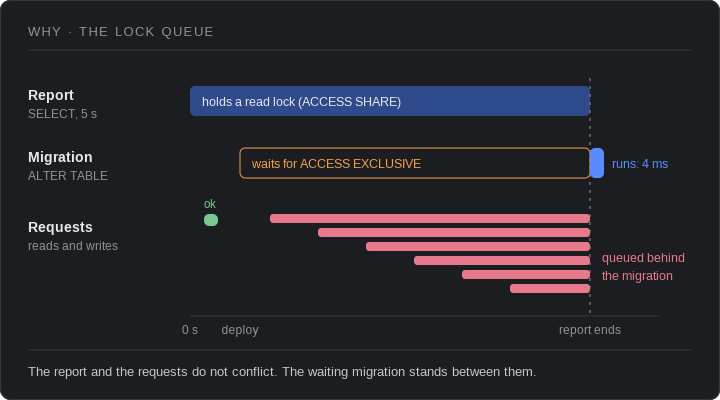
The report could run next to the application all day. It becomes a problem only because the migration is standing between them.
The blocker does not have to be a report. Anything that has touched the table and has not finished its transaction will do: a slow query, a backup, a session left open in a database console with a BEGIN and no COMMIT.
The lock queue is one of three ways a schema change stops a table. They differ in what is blocked and for how long:
| Change | Lock it takes | What waits | For how long |
|---|---|---|---|
ADD COLUMN (nullable) |
ACCESS EXCLUSIVE |
Reads and writes | Milliseconds, plus the time it waits for its own lock |
CREATE INDEX |
SHARE |
Writes | The whole index build |
ADD CONSTRAINT ... CHECK, SET NOT NULL |
ACCESS EXCLUSIVE |
Reads and writes | A scan of every row |
The sample at the end of this article runs all three against a table of two million rows while a client sends five reads and five writes per second, each with a one-second timeout:
| Change | Reads timed out | Writes timed out |
|---|---|---|
ADD COLUMN behind a 5-second report |
19 of 27 | 19 of 27 |
CREATE INDEX |
0 of 21 | 14 of 21 |
ADD CONSTRAINT ... CHECK |
3 of 11 | 3 of 11 |
The fix: three habits
1. Never wait for a lock without a limit
Tell the migration how long it may stand in the queue:
BEGIN;
SET LOCAL lock_timeout = '300ms';
ALTER TABLE invoices ADD COLUMN notes text;
COMMIT;
If the lock is not free within 300 ms, the statement fails with error 55P03 and leaves the queue. The requests behind it go ahead. The migration then tries again a moment later:
for (var attempt = 1; ; attempt++)
{
    await using var connection = await dataSource.OpenConnectionAsync(ct);
    await using var transaction = await connection.BeginTransactionAsync(ct);
    try
    {
        await ExecuteAsync(connection, transaction, "SET LOCAL lock_timeout = '300ms'", ct);
        await ExecuteAsync(connection, transaction, sql, ct);
        await transaction.CommitAsync(ct);
        return attempt;
    }
    catch (PostgresException ex) when (ex.SqlState == PostgresErrorCodes.LockNotAvailable && attempt < 40)
    {
        await transaction.RollbackAsync(ct);
        await Task.Delay(TimeSpan.FromMilliseconds(700), ct);
    }
}
SET LOCAL lasts until the end of the transaction, so the setting never leaks to a pooled connection. In an EF Core migration, put migrationBuilder.Sql("SET LOCAL lock_timeout = '300ms';") first in Up, and let the deployment step that applies migrations retry on failure.
In the sample the same ALTER TABLE behind the same report needed six attempts and 5.1 seconds, and no request timed out.
Demosthenes tells of a custom among the Locrians: whoever proposed a new law did so with a halter round his neck, and if the proposal was rejected, the halter was drawn tight. lock_timeout is that arrangement for schema changes. When the change can't be made now, it is the migration that dies, and not the traffic behind it.
2. Build indexes concurrently
A plain CREATE INDEX lets reads through and blocks every write until the index is built. CREATE INDEX CONCURRENTLY builds the same index while writes continue:
migrationBuilder.Sql(
    "CREATE INDEX CONCURRENTLY ix_invoices_customer ON invoices (customer);",
    suppressTransaction: true);
suppressTransaction: true is required, because a concurrent build can't run inside a transaction and EF Core wraps each migration in one.
It has two costs. It takes somewhat longer, because it scans the table twice. And if it fails or is cancelled, it leaves the index behind, marked invalid: every write maintains it and no query uses it. A build that ends without an error is valid, so the times to look are after a failed build and before you run one again:
SELECT indisvalid FROM pg_index WHERE indexrelid = 'ix_invoices_customer'::regclass;If the answer is false, remove the index with DROP INDEX CONCURRENTLY and build it again.
Don't put a short lock_timeout on a concurrent build, since a timeout is one of the ways it ends up invalid. And don't write CREATE INDEX CONCURRENTLY IF NOT EXISTS in a script that is retried: the second run finds the invalid index, sees that it exists and reports success.
3. Split every change that reads or rewrites all rows
A CHECK constraint is verified against every existing row while the table is locked for reads and writes. Do it in two statements, in two transactions:
ALTER TABLE invoices
    ADD CONSTRAINT ck_invoices_number CHECK (number ~ '^INV-[0-9]+$') NOT VALID;

-- Commit here. The lock taken above must be released before the scan starts.

ALTER TABLE invoices VALIDATE CONSTRAINT ck_invoices_number;
The first enforces the rule for new and changed rows and returns at once. The second checks the old rows under a lock that lets reads and writes through.
The commit between them matters. The first statement takes ACCESS EXCLUSIVE, and PostgreSQL holds a lock until the transaction ends. In one transaction the scan would run under that lock, and nothing would be gained. EF Core wraps each migration in a transaction, and EF Core 9 wraps all pending migrations in one, so two migrationBuilder.Sql calls are not enough. Give the VALIDATE statement suppressTransaction: true, as for the concurrent index, and check that the generated script commits between the two.
The same route leads to NOT NULL without a blocking scan: add CHECK (column IS NOT NULL) NOT VALID, validate it, then SET NOT NULL, which PostgreSQL can now do without scanning because the constraint already proves it.
Changes that no single safe statement can make, such as renaming a column or changing its type, are spread over several deployments:
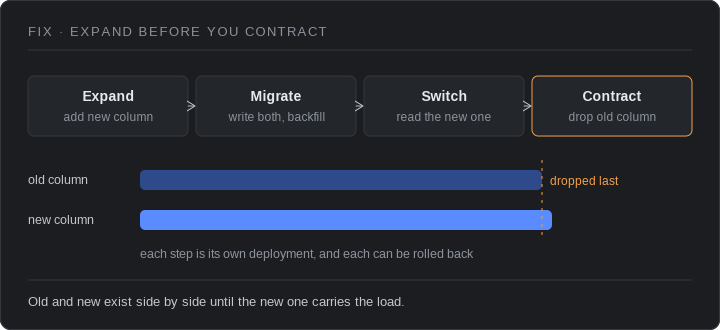
| Step | Database | Application |
|---|---|---|
| Expand | Add the new column, nullable | Unchanged |
| Migrate | Copy old rows in batches of a few thousand, each in its own transaction | Writes both columns |
| Switch | Nothing | Reads the new column |
| Contract | Drop the old column | No longer mentions it |
The old and the new exist side by side until the new one carries the load. Dropping the old column comes last for that reason.
What safe migrations ask of you
- More deployments per change. A rename is four small deployments. Each is boring, which is the goal.
- A retry in the pipeline. A migration with
lock_timeoutfails on purpose when the table is busy. The step that runs it has to try again, and to give up loudly after a limit. - A limit on the other side as well.
idle_in_transaction_session_timeoutends sessions that hold locks and do nothing, so a forgotten console can't block deployments for hours. - Migrations as a deployment step. Calling
Migrate()when the application starts means every instance tries, during the very rollout that is replacing instances. - Backfills in batches. One
UPDATEover two million rows holds its row locks until it commits and produces one very large transaction for replicas to replay. - A rehearsal with real sizes and real traffic. A migration that takes four milliseconds on an empty staging table says nothing about production. The sample is a small version of that rehearsal.
When you don't need any of this
| Situation | Smaller answer |
|---|---|
| The table has a few thousand rows and no long transactions | A plain migration; the scan and the build take milliseconds |
| The table is new and nothing reads it yet | Create it with its indexes and constraints in one go |
| The system has a maintenance window that users accept | Run the plain migration inside it |
| The product has not launched | Keep migrations simple until there is traffic to protect |
lock_timeout is the exception: it costs one line and belongs in every migration that touches an existing table, whatever the table's size.
The rule
- A schema change is a lock request first. Ask what it locks, what waits behind it and for how long, before asking how long the statement runs.
- Never wait for a lock without a limit. Set
lock_timeout, fail fast and retry. - Split every change that reads or rewrites all rows. Build indexes concurrently, validate constraints separately, and expand before you contract.
Run it yourself
The companion sample is a minimal ASP.NET Core API that runs entirely in Docker, next to PostgreSQL. On start it loads two million invoices. A small client sends steady traffic while six schema changes run, three written the obvious way and three the safe way.
docker compose up -d --builddocker compose run --rm demoThe output on my machine:
Table invoices: 2,000,000 rows. Traffic: 5 reads and 5 writes per second, each with a 1 s timeout.

1. ALTER TABLE ... ADD COLUMN while a 5-second report is reading the table
   migration: 1 attempt(s), 4.7 s
   reads:     27 sent, 19 timed out, 3 slower than 500 ms
   writes:    27 sent, 19 timed out, 2 slower than 500 ms

2. The same, with lock_timeout = 300 ms and a retry
   migration: 6 attempt(s), 5.1 s
   reads:     27 sent, 0 timed out, 0 slower than 500 ms
   writes:    27 sent, 0 timed out, 0 slower than 500 ms

3. CREATE INDEX
   migration: 1 attempt(s), 3.7 s
   reads:     21 sent, 0 timed out, 0 slower than 500 ms
   writes:    21 sent, 14 timed out, 2 slower than 500 ms

4. CREATE INDEX CONCURRENTLY
   migration: 1 attempt(s), 3.9 s
   reads:     22 sent, 0 timed out, 0 slower than 500 ms
   writes:    22 sent, 0 timed out, 0 slower than 500 ms

5. ADD CONSTRAINT ... CHECK
   migration: 1 attempt(s), 1.5 s
   reads:     11 sent, 3 timed out, 3 slower than 500 ms
   writes:    11 sent, 3 timed out, 3 slower than 500 ms

6. ADD CONSTRAINT ... CHECK NOT VALID, then VALIDATE CONSTRAINT
   migration: 1 attempt(s), 1.5 s
   reads:     10 sent, 0 timed out, 0 slower than 500 ms
   writes:    10 sent, 0 timed out, 0 slower than 500 ms
Each safe version takes about as long as the unsafe one. The time was never the problem. What changes is who waits.
The demo has limits. Its traffic is ten requests per second; with real traffic the requests that pile up behind the lock also use up the connection pool. The exact counts depend on the machine, so the client checks the pattern, failures in steps 1, 3 and 5 and none in steps 2, 4 and 6, and exits with code 1 if it differs. The schema changes are plain SQL; the README shows how each maps to an EF Core migration.
Further reading
- PostgreSQL: explicit locking and lock modes
- PostgreSQL: ALTER TABLE, notes on locks, NOT VALID and VALIDATE CONSTRAINT
- PostgreSQL: building indexes concurrently
- PostgreSQL: lock_timeout and idle_in_transaction_session_timeout
- EF Core: custom SQL in migrations
This article is part of Justified Complexity: Building Backends One Decision at a Time.
Updated 2026-11-12, after a review: the NOT VALID and VALIDATE statements must run in separate transactions, and the article now says so and explains what that means in an EF Core migration; the check for an invalid index belongs after a failed build and before a rerun, since a build that succeeds is always valid, and the sample now does that.